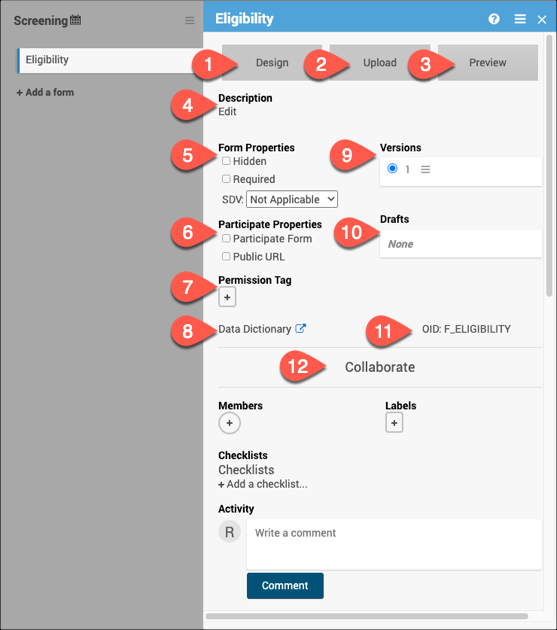
1. Design
Click Design to use Form Designer to create or make changes to your form instead of or in addition to using the Form Template.
2. Upload
Click Upload to use the Form Template to create or make changes to your form instead of or in addition to using Form Designer.
3. Preview
Use Preview to preview the default version of the form for data entry. The button will change to Preview (as a Participant) if it is marked as a Participate form.
4. Description
Add, edit, or remove a brief description for the form.
5. Form Properties
Use the Form Properties section to mark a form as Hidden or Required. Here you can also set the SDV status for the form.
Source Data Verification (Monitor)
Source Data Verification (Data Manager)
6. Participate Properties
*This section will only appear if the Participate module is activated for your study. Here, you can specify if the form is a Participate form (where participants will fill out the form), if it will have a Public URL, and if the form will be offline capable.
7. Permission Tag
Use Permission Tags to determine which User Roles can access data from specific Forms in Study Runner.
8. Data Dictionary
The Data Dictionary gives you form-specific information including form metadata, form properties, and item metadata (such as Item OID, Item Group Name, Item Group OID, Item Type, and Insight Table). The Data Dictionary is available via a link on each form card in Study Designer and can be downloaded as a CSV file to view outside of Study Designer.
Locating Object Identifiers in a Study
9. Versions
This section displays all available versions of the form and indicates the default version. Click on the menu next to the version name to display all available actions for the version.
10. Drafts
Drafts will display the pending version of the form. Click the menu to view all actions for the draft including saving the draft as a version.
11. OID
Quickly view the form OID to reference for different form functions.
Locating Object Identifiers in a Study
12. Collaborate
The Collaborate section includes multiple features to facilitate collaboration with colleagues while building your study.
Additional Resources for Form Cards
Designing Forms
Use this section to get started designing forms within your study, learn about events, and understand the basics with form templates.
Logic and Functions
Use this section to go beyond the basics with your forms by using functions and logic.
Example Forms
Use this section to view sample CDISC CDASH-compliant eCRF templates that can be customized or imported as-is to the OpenClinica EDC platform.
Was this article helpful?
That’s Great!
Thank you for your feedback
Sorry! We couldn't be helpful
Thank you for your feedback
Feedback sent
We appreciate your effort and will try to fix the article